
What Is the World Wide Web? A Complete Guide
Table of Contents
If you use the internet every day, you probably visit websites without thinking about what happens behind the scenes. You search for something on Google, watch a YouTube video, read a blog, shop online, check social media, or visit a business website. All of these experiences are connected to something called the World Wide Web, usually shortened to WWW or simply the Web.
The World Wide Web has become a huge part of our everyday lives. It helps us find information, communicate with other people, learn new skills, run businesses, buy products, watch entertainment, and use online services. However, many people still confuse the World Wide Web with the Internet. Although they are closely connected, they are actually two different things.
The Internet is the worldwide network that connects computers, phones, servers, and other devices. The World Wide Web is a system that uses that network to provide websites, web pages, online applications, images, videos, documents, and other resources.
The Web works through several technologies, including HTML, CSS, JavaScript, URLs, HTTP, HTTPS, web browsers, web servers, DNS, and hyperlinks. These technologies work together whenever you open a website.
The story of the World Wide Web began in 1989, when British computer scientist Tim Berners-Lee proposed a system at CERN that would make it easier for researchers to share information. What started as a solution to an information-sharing problem eventually became one of the most influential technologies in the world.
In this guide, we’ll take a closer look at what the World Wide Web is, how it works, who created it, how websites are built, the difference between the Internet and the Web, and why the Web is so important for individuals and businesses today.
In this guide, we’ll take a closer look at what the World Wide Web is, how it works, who created it, how websites are built, the difference between the Internet and the Web, and 7 important reasons why the Web is so valuable for individuals and businesses today.
What Is the World Wide Web?
The World Wide Web is a collection of interconnected websites and online resources that people can access through the Internet.
Think about the last time you visited a website. You probably opened a browser, typed a web address, clicked a link, or searched for something. Your browser then connected to a server and retrieved the information you wanted.
That’s the Web in action.
One of the most important ideas behind the Web is the hyperlink. A hyperlink allows one piece of online content to connect to another. For example, while reading an article about web development, you might click a link that takes you to another article about HTML.
This ability to connect information is one of the main reasons the system is called a “Web.”
Today, the Web contains almost every type of digital content you can imagine, including:
- Websites and web pages
- Blogs and online magazines
- Images and graphics
- Videos and audio
- Online stores
- Social media platforms
- Educational websites
- Business websites
- Search engines
- Online banking services
- Web applications
- Digital documents
- Online tools and calculators
So, the Web isn’t simply a collection of pages. It’s a massive, interconnected environment where people can find information and use online services.
Who Invented the World Wide Web?
The World Wide Web was created by Tim Berners-Lee, a British computer scientist who was working at CERN.
In 1989, Berners-Lee proposed an idea for a system that would allow researchers to share information more easily between different computers and locations.
At that time, information was often stored on separate systems, making it difficult for researchers to find and share documents. Berners-Lee believed there should be a simpler way to connect this information.
His idea eventually led to the development of several technologies that became the foundation of the Web, including:
- HTML
- HTTP
- URLs
- Web browsers
- Web servers
- Hyperlinks
By 1990, Berners-Lee had created the first Web server and browser at CERN.
The first website was also created at CERN and explained the World Wide Web project itself. Its original address was info.cern.ch.
It’s difficult to imagine today, but the first version of the Web was extremely simple compared with the websites and applications we use now.
Why Was the World Wide Web Created?
The Web wasn’t originally created for online shopping, social media, entertainment, or digital marketing.
Its original purpose was much simpler: making information easier to share.
CERN had researchers working on projects across different locations and institutions. They needed a better way to organize and share information.
Berners-Lee’s idea was to create a system where information could be connected through hyperlinks and accessed from different computers.
The basic idea was simple:
- Information should be easy to connect.
- People should be able to access information easily.
- Different computers should be able to communicate using common standards.
That simple idea eventually grew into the global Web we use today.
One important reason the Web became so successful was that CERN made the Web technology available without royalty fees. This helped other organizations and developers adopt and improve the technology.
Internet vs World Wide Web: What’s the Difference?
This is one of the most common questions people have.
The Internet and the World Wide Web are not the same thing.
What Is the Internet?
The Internet is the huge global network that connects computers and devices around the world.
It includes:
- Computers
- Smartphones
- Servers
- Routers
- Data centers
- Network infrastructure
The Internet supports many different services, such as:
- Online gaming
- Video calls
- Messaging
- File transfers
- Streaming
- The World Wide Web
What Is the World Wide Web?
The World Wide Web is one service that operates using the Internet.
It uses technologies such as HTML, HTTP, URLs, browsers, and servers to provide websites and online resources.
A simple way to remember the difference is:
Internet = the network
World Wide Web = a service that runs on that network
For example, when you send an email, you’re using the Internet, but you aren’t necessarily using the Web.
When you open Chrome and visit a website, you’re using the World Wide Web.
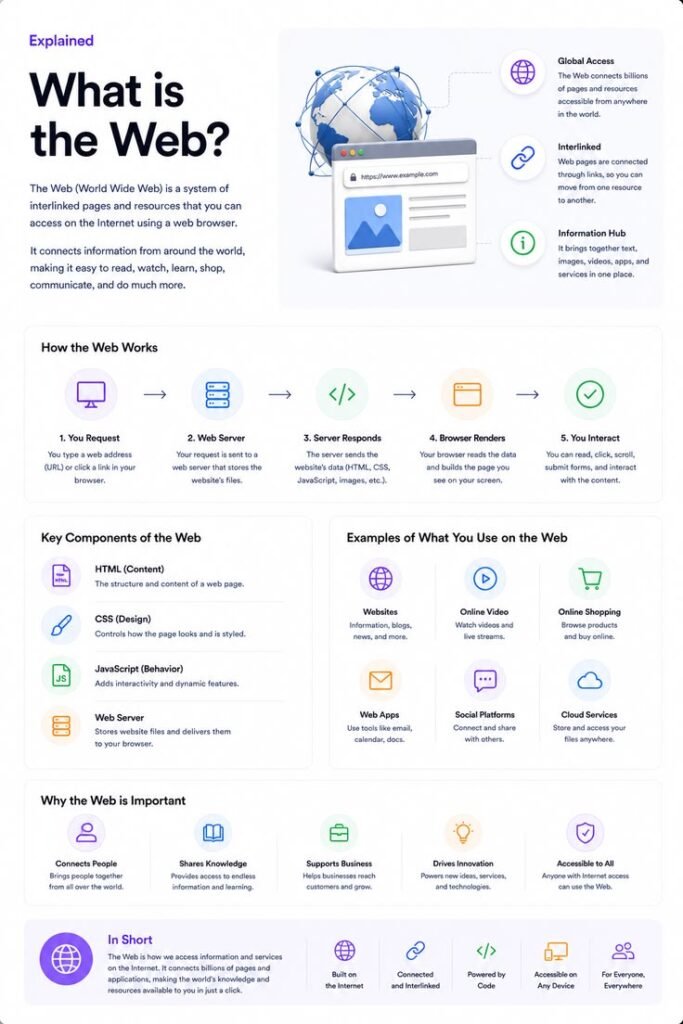
How Does the World Wide Web Work?
The Web may look simple when you’re using it, but quite a few things happen in the background every time you visit a website.
Let’s say you want to visit:
Here’s a simplified version of what happens.
Step 1: You Enter a Web Address
You type a URL into your browser.
A URL tells the browser where the resource is located and which communication protocol should be used.
For example:
Here:
httpsis the protocolexample.comis the domain/aboutis the path to a specific resource
Step 2: DNS Finds the Website
Computers don’t normally locate websites by using names such as example.com. They use IP addresses.
This is where DNS, or the Domain Name System, comes in.
DNS translates the domain name into the IP address associated with the server.
You can think of DNS like the Internet’s phone book. You remember the name, while the system finds the corresponding address.
Step 3: Your Browser Sends a Request
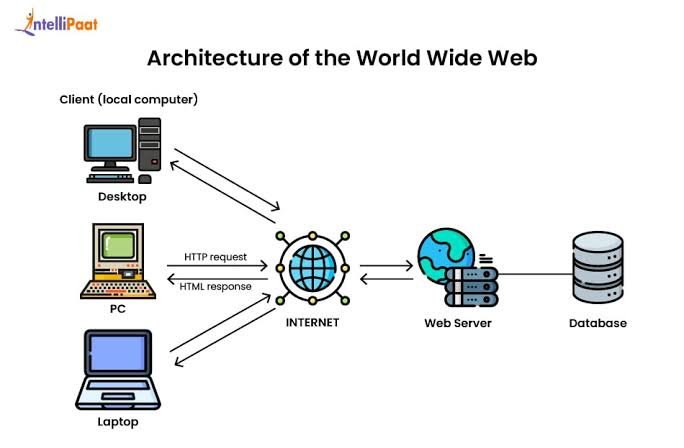
Once the browser knows where the website is located, it sends a request to the server.
The request basically asks the server for the page or resource you want.
Step 4: The Server Responds
The server receives your request and determines what information it needs to send back.
For a simple website, it might return an HTML file.
For a more advanced website, the server may also communicate with databases, APIs, authentication systems, and other software.
Step 5: The Browser Receives the Files
The server can send back different resources, such as:
- HTML
- CSS
- JavaScript
- Images
- Fonts
- Videos
- Data
Step 6: The Browser Builds the Page
Finally, your browser processes those resources and displays the website on your screen.
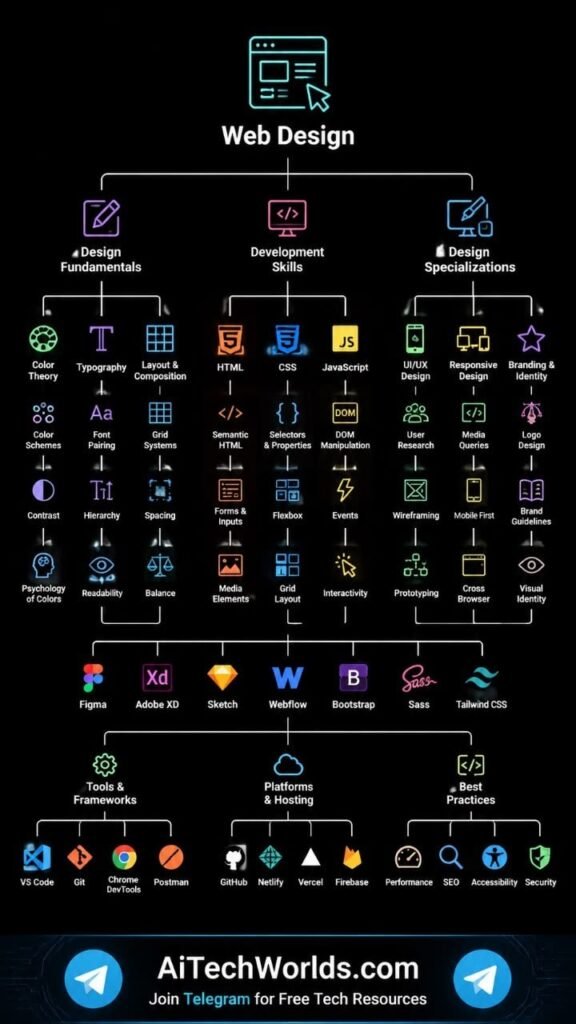
HTML provides the structure, CSS controls the design, and JavaScript adds functionality and interaction.
All of this can happen in just a few seconds or less.
What Is a Web Browser?
A web browser is the software you use to access websites.
Some popular browsers include:
- Google Chrome
- Microsoft Edge
- Mozilla Firefox
- Safari
- Opera
When you type a website address into a browser, it communicates with the appropriate server, receives the required files, processes them, and displays the final page.
Browsers can also handle things like cookies, local storage, JavaScript, security certificates, downloads, and user permissions.
The first Web browser was created by Tim Berners-Lee at CERN in 1990.
Unlike modern browsers, the original browser was very basic. It was designed to browse and edit Web documents.
What Is a Web Server?
A web server is responsible for storing and delivering website resources.
When you visit a website, your browser sends a request to a server. The server then sends the requested information back to your browser.
A server may contain:
- HTML files
- CSS files
- JavaScript files
- Images
- Videos
- Databases
- Application code
- Website configuration
Popular web server software includes Apache and Nginx.
Modern websites can also use cloud servers, content delivery networks, containers, serverless systems, and other technologies.
You don’t necessarily need to understand all of these technologies to build a simple website, but they become increasingly important as websites grow.
What Is HTML?
HTML stands for HyperText Markup Language.
It’s the main language used to structure content on Web pages.
HTML tells the browser what different parts of a page are.
For example, HTML can create:
- Headings
- Paragraphs
- Links
- Images
- Lists
- Forms
- Tables
- Buttons
- Videos
- Sections
A simple example might look like this:
<h1>Welcome to My Website</h1>

<p>This is my business website.</p>

<a href="https://example.com">Learn More</a>
HTML gives a website its basic structure.
However, HTML alone usually won’t make a website look modern or attractive. That’s where CSS comes in.
What Is CSS?
CSS stands for Cascading Style Sheets.
CSS is used to control the appearance of a website.
With CSS, developers can change things such as:
- Colors
- Fonts
- Spacing
- Backgrounds
- Borders
- Layouts
- Animations
- Button styles
- Responsive layouts
For example, HTML might create a button, while CSS can make that button blue, rounded, larger, and animated when someone hovers over it.
A simple way to remember it is:
HTML = structure
CSS = appearance
Keeping structure and design separate makes websites easier to manage and update.
What Is JavaScript?
JavaScript is a programming language that adds behavior and interactivity to websites.
For example, JavaScript can make it possible to create:
- Interactive menus
- Image sliders
- Calculators
- Form validation
- Pop-ups
- Dynamic content
- Interactive dashboards
- Web applications
- Real-time features
Imagine clicking a button and seeing new information appear without refreshing the entire page. JavaScript can make that possible.
HTML, CSS, and JavaScript are often considered the three fundamental technologies behind front-end Web development.
What Is HTTP?
HTTP stands for HyperText Transfer Protocol.
It’s a communication protocol used when browsers and web servers exchange information.
A simple way to visualize it is:
Browser → Request → Server
Server → Response → Browser
For example, your browser may request a particular page, and the server responds with the HTML and other resources needed to display it.
HTTP is one of the technologies that makes communication across the Web possible.
What Is HTTPS?
HTTPS stands for HyperText Transfer Protocol Secure.
It’s the secure version of HTTP and helps protect communication between your browser and a website.
HTTPS is especially important when you’re entering sensitive information such as:
- Passwords
- Payment details
- Login information
- Personal information
Modern websites are generally expected to use HTTPS, particularly when handling user data.
When you see a secure connection indicator in your browser, it generally means the connection is protected using HTTPS.
What Is a URL?
A URL, or Uniform Resource Locator, is the address used to locate a resource on the Web.
For example:
This URL can be broken into several parts.
Protocol
https://
This tells the browser how to communicate with the website.
Domain
example.com
This identifies the website.
Path
/blog/web-development
This identifies a particular page or resource.
URLs make it possible to directly access specific resources on the Web.
What Are Hyperlinks?
A hyperlink is a clickable connection between one online resource and another.
For example, an article might contain links to:
- Related blog posts
- Product pages
- Service pages
- Contact pages
- Research sources
- Downloadable documents
Links are a major part of what makes the Web different from a collection of disconnected documents.
You can start on one page and follow links through many related resources.
That’s essentially how the “Web” concept works.
What Is a Domain Name?
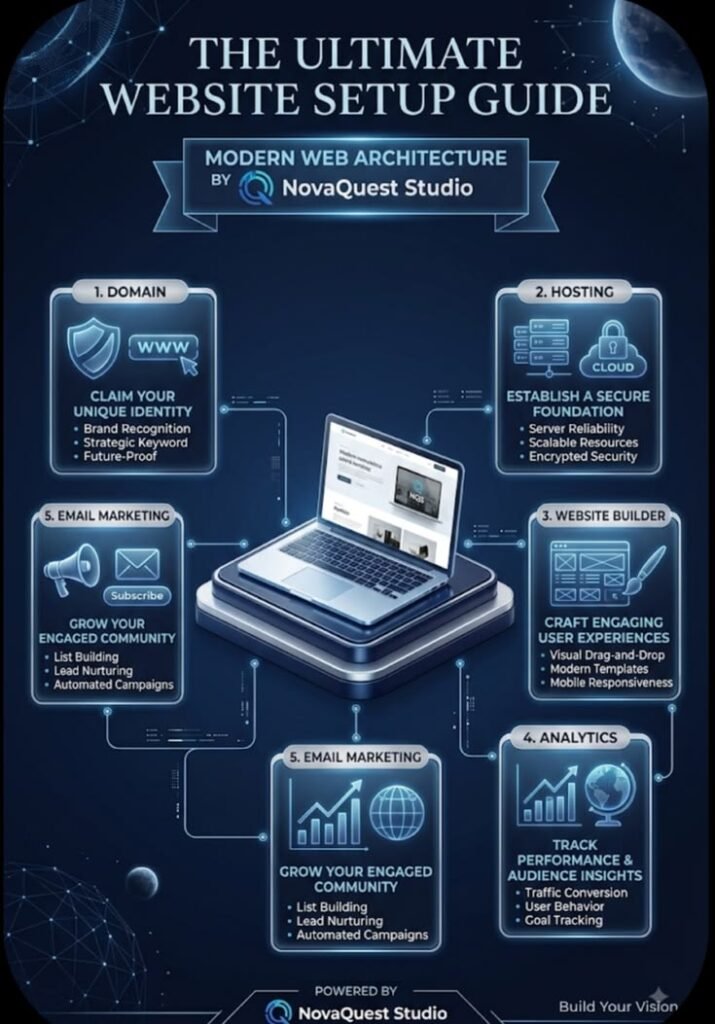
A domain name is the easy-to-remember address people use to visit a website.
Examples include:
- google.com
- wikipedia.org
- example.com
Without domain names, users would generally have to remember numerical IP addresses to visit websites.
For businesses, choosing a good domain name can also help create a professional online identity.
A company might choose a domain based on its brand name, industry, location, or service.
What Is Web Hosting?
Creating a website is only part of the process. The website also needs somewhere to live.
That’s where web hosting comes in.
Web hosting provides the server space and infrastructure needed to make your website accessible online.
Depending on the hosting package, it may provide space for:
- Website files
- Databases
- Images
- Emails
- Applications
- Backups
Common types of hosting include:
- Shared hosting
- VPS hosting
- Dedicated hosting
- Cloud hosting
- Managed hosting
The right choice depends on your website’s size, expected traffic, technical requirements, and budget.

How Are Websites Created?
There are several ways to create a website.
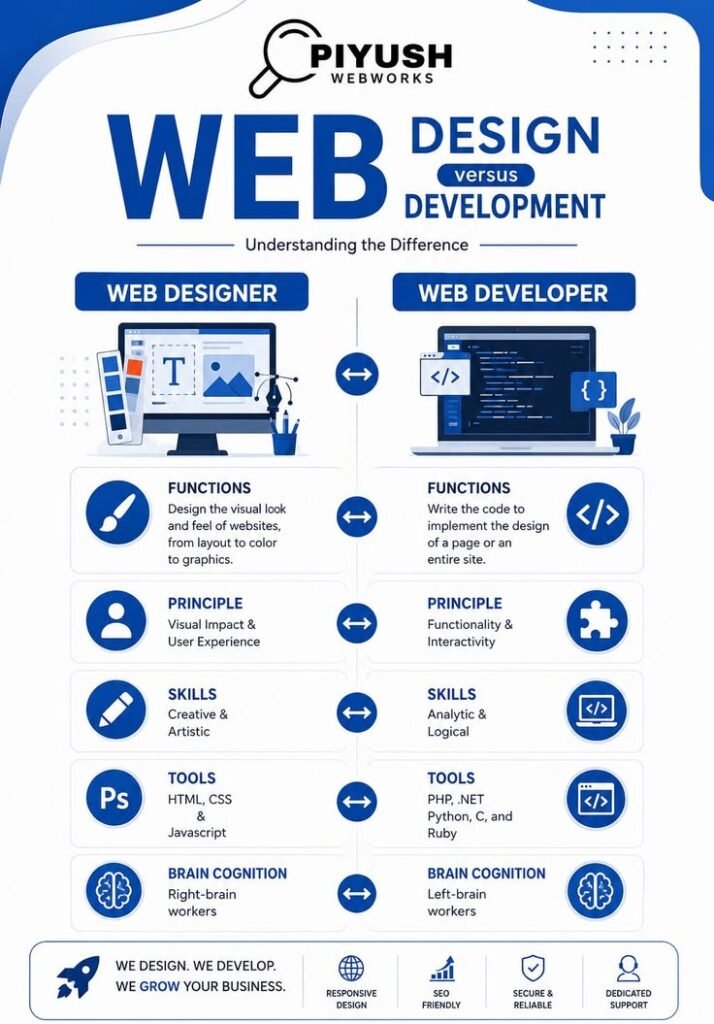
A developer can build one from scratch using HTML, CSS, and JavaScript. More advanced websites may also require databases, APIs, programming languages, frameworks, and cloud infrastructure.
Another popular option is a Content Management System (CMS).
WordPress is one of the most widely used examples. It allows people to create and manage websites without manually coding every page.
Professional websites can combine many different areas, including:
- Front-end development
- Back-end development
- Databases
- APIs
- SEO
- Hosting
- Security
- Analytics
- Content management
If you’re interested in professional website development, you can also explore Uzair Web Development for more information about web development services.

Front-End vs Back-End Development
Website development is often divided into two main areas: front-end and back-end development.
Front-End Development
Front-end development focuses on everything visitors see and interact with.
Common technologies include:
- HTML
- CSS
- JavaScript
- React
- Vue
- Angular
A front-end developer works on things like:
- Page layouts
- Navigation
- Buttons
- Forms
- Animations
- Mobile responsiveness
- User interfaces
Back-End Development
Back-end development deals with what happens behind the scenes.
It can handle:
- User accounts
- Databases
- Payments
- Authentication
- APIs
- Business logic
- Data processing
Common back-end technologies include PHP, Python, Java, Node.js, Ruby, and others.
A large Web application usually needs both front-end and back-end systems working together.
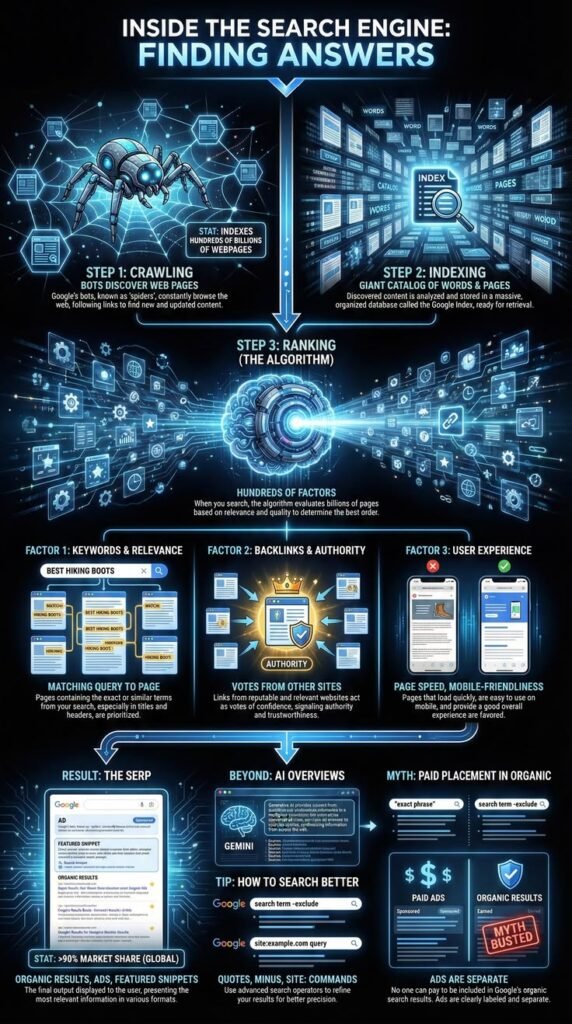
What Is a Search Engine?
A search engine helps people find information on the Web.
Some well-known search engines include:
- Bing
- DuckDuckGo
Search engines discover and organize Web pages so that users can find information related to their searches.
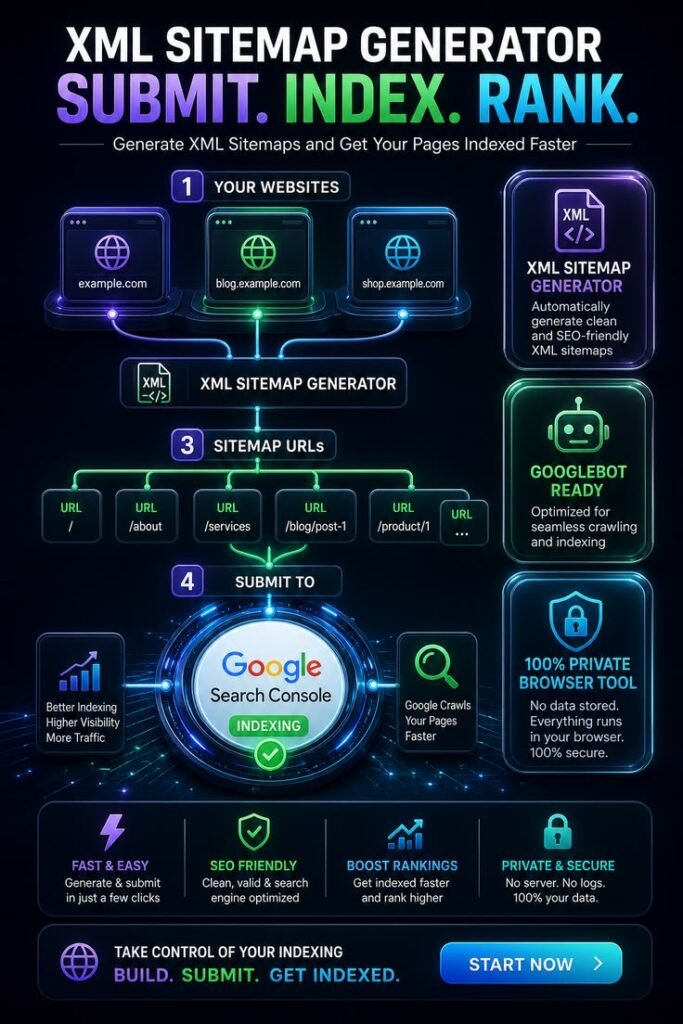
This is one reason SEO, or Search Engine Optimization, is important for website owners.
SEO involves improving a website so search engines can understand its content and users can discover it through relevant searches.
Important SEO areas include:
- Useful content
- Page titles
- Headings
- Internal links
- Website speed
- Mobile usability
- Technical SEO
- Search intent
- Structured data
- Quality backlinks
Why Are Internal Links Important?
Internal links are links that connect pages on the same website.
For example, a roofing website might have separate pages for:
- Metal Roofing
- Tile Roofing
- Slate Roofing
- Roofing Contractors
- Roofing Costs
A blog post about metal roofing could link to the website’s other relevant roofing pages.
Internal linking helps visitors find related information without having to search for it themselves.
It can also help search engines understand the structure and relationships between pages.
A good internal linking strategy should feel natural and genuinely help the reader.
Why Are External Links Important?
External links take visitors from your website to another website.
For example, when discussing the history of the Web, you might link to reliable sources such as CERN or the W3C.
External links can help readers find additional information and allow you to support factual claims with trustworthy sources.
However, you shouldn’t add external links just to make an article look more authoritative. The links should actually provide value to the reader.
How Has the World Wide Web Changed?
The Web has changed dramatically since its early days.
Early websites were usually simple pages containing mostly text and hyperlinks.
Over time, browsers and Web technologies became more powerful.
Web 1.0
Web 1.0 is often used to describe the early Web.
Most websites were primarily designed for reading information.
Users generally consumed content rather than actively creating it.
Web 2.0
Later, the Web became much more interactive.
Users could:
- Create posts
- Upload photos
- Write comments
- Share content
- Create videos
- Participate in online communities
Social media and user-generated content became major parts of the Web.
Modern Web Applications
Today, many websites behave more like complete software applications.
For example, you can use a browser to:
- Manage your finances
- Edit documents
- Shop online
- Attend classes
- Manage projects
- Communicate with teams
- Stream entertainment
The difference between a traditional website and a Web application has become much less obvious.
Why Are Web Standards Important?
Imagine if every browser interpreted websites completely differently. The Web would be much harder to use.
That’s why Web standards are important.
The World Wide Web Consortium (W3C) develops standards and recommendations that help create a more consistent and interoperable Web.
These standards cover areas such as:
- HTML
- CSS
- Accessibility
- APIs
- Graphics
- Security
- Privacy
- Internationalization
- Web applications
Following widely accepted standards helps developers build websites that work across different browsers and devices.
What Is Web Accessibility?
Web accessibility means making websites usable by as many people as possible, including people with disabilities.

For example, a website can be designed to work properly with screen readers and keyboard navigation.
Accessibility can involve:
- Adding alternative text to images
- Using clear headings
- Providing keyboard navigation
- Making forms accessible
- Adding captions to videos
- Maintaining readable text
- Using proper HTML structure
Accessibility doesn’t just help people with disabilities. Many accessibility improvements also make websites easier for everyone to use.
What Is Responsive Web Design?
People don’t access websites from just desktop computers anymore.
A website might be opened on:
- Smartphones
- Tablets
- Laptops
- Desktop computers
- Large screens
Responsive Web Design allows a website to adapt to different screen sizes.
A responsive website can adjust its:
- Layout
- Images
- Text
- Navigation
- Buttons
- Spacing
- Columns
This is particularly important for businesses because many visitors browse websites from mobile devices.
A website that works well on both desktop and mobile provides a much better user experience.
Why Is Web Security Important?
Security is an important part of running a website.
Websites can face different types of threats, including:
- Malware
- Phishing
- Password attacks
- Data theft
- Injection attacks
- Cross-site scripting
- Unauthorized access
Website owners should take reasonable security precautions, such as:
- Using HTTPS
- Keeping software updated
- Using strong passwords
- Protecting administrator accounts
- Creating backups
- Using secure hosting
- Handling user information carefully
The level of security required depends on the website.
An online banking platform, for example, needs far more security controls than a simple personal blog.
Advantages of the World Wide Web
The Web has brought many benefits to society.
Easy Access to Information
People can find information about almost any subject within seconds.
Global Communication
The Web makes it possible for people and businesses to communicate across countries and continents.
Online Education
Students can access courses, tutorials, research, digital libraries, and educational videos.
Business Opportunities
Businesses can reach customers outside their local areas and even operate internationally.
E-Commerce
People can browse and purchase products online without visiting a physical store.
Entertainment
The Web provides access to videos, music, games, news, articles, and many other forms of entertainment.
Remote Work
Web-based tools allow people to communicate and work together even when they are in different locations.
Publishing
Individuals and organizations can publish information and reach a global audience without relying on traditional media.
Disadvantages of the World Wide Web
The Web also has some disadvantages.
Privacy Problems
Many websites and online services collect user information. It’s important to understand how your data is being used.
Cybersecurity Risks
Online accounts and websites can be targeted by attackers.
Misinformation
Not everything published online is accurate. Users need to check sources before trusting or sharing information.
Online Scams
Fake websites, phishing messages, fraudulent stores, and other scams can cause serious problems.
Too Much Screen Time
Spending too much time online can affect productivity and daily routines.
Digital Divide
Not everyone has the same access to reliable Internet connections, modern devices, or digital education.
These challenges show why digital literacy, cybersecurity awareness, privacy protection, and responsible Internet use are so important.
Why Is the World Wide Web Important for Businesses?
For many businesses, a website is now much more than an online brochure.
A good website can help a company:
- Explain its services
- Display products
- Generate leads
- Receive customer inquiries
- Sell products
- Build trust
- Publish useful information
- Reach new markets
- Support existing customers
For a small business, a professional website can also make the company appear more established and accessible.
A strong business website should generally be easy to navigate, mobile-friendly, secure, reasonably fast, and filled with useful information.
It can also become the center of a broader digital marketing strategy involving SEO, social media, advertising, email marketing, and content marketing.
World Wide Web and Digital Marketing
The Web has completely changed the way businesses market themselves.
In the past, companies depended heavily on newspapers, television, radio, brochures, signs, and other traditional forms of advertising.
Today, businesses can reach potential customers through:
- Search engines
- Websites
- Blogs
- Social media
- Online advertising
- Video platforms
- E-commerce websites
For example, a business might publish a helpful blog article, optimize it for search engines, share it on social media, and then direct readers to a related service page.
This allows different parts of a digital marketing strategy to work together.
World Wide Web and E-Commerce
Online shopping is another major use of the Web.
An e-commerce website allows businesses to display products and customers to browse and purchase them online.
A typical online store might include:
- Product pages
- Shopping carts
- Payment systems
- Customer accounts
- Product reviews
- Search and filters
- Order tracking
- Shipping information
Small businesses can run simple online stores, while large companies can operate huge e-commerce platforms serving customers around the world.
The Web has therefore changed the way people buy and sell products and services.
What Is the Future of the World Wide Web?
The Web is still evolving, and new technologies continue to change how people use it.
Some important areas likely to shape the future include:
- Artificial intelligence
- Cloud computing
- Advanced Web applications
- Real-time communication
- Better accessibility
- Improved security
- Privacy-focused technologies
- Immersive experiences
- Connected devices
Artificial intelligence is already changing the way people search for information, create content, build software, and interact with online services.
At the same time, Web standards continue to develop.
The future Web will likely become more interactive, intelligent, personalized, and closely connected with the tools people use every day.

Frequently Asked Questions About the World Wide Web
What does WWW stand for?
WWW stands for World Wide Web. It is a system of interconnected online resources that people access through the Internet.
Who invented the World Wide Web?
The World Wide Web was invented by Tim Berners-Lee while working at CERN in 1989.
When was the World Wide Web created?
Tim Berners-Lee proposed the Web in 1989, and important components such as the first Web server and browser were developed by 1990.
What was the first website?
The first website was created at CERN and explained the World Wide Web project. Its original address was info.cern.ch.
Is the Internet the same as the World Wide Web?
No. The Internet is the worldwide network, while the World Wide Web is a service that uses that network.
What is a web browser?
A web browser is software that lets you visit and interact with websites. Chrome, Firefox, Safari, and Edge are common examples.
What is HTML?
HTML stands for HyperText Markup Language. It is used to structure content on Web pages.
What is CSS?
CSS stands for Cascading Style Sheets. It controls the appearance and layout of Web pages.
What is JavaScript?
JavaScript is a programming language commonly used to make websites interactive and dynamic.
What is a URL?
A URL is the address used to locate a particular resource on the Web.
What is HTTP?
HTTP stands for HyperText Transfer Protocol. It is used for communication between browsers and Web servers.
What is HTTPS?
HTTPS is the secure version of HTTP. It encrypts communication between a browser and a website.
Why do businesses need websites?
A website can help businesses build an online presence, attract customers, display products or services, generate leads, and communicate with their audience.
Is the World Wide Web still growing?
Yes. The Web continues to develop through new technologies, standards, applications, security improvements, and accessibility features.
Conclusion
The World Wide Web started with a relatively simple idea: make information easier to share and connect.
Tim Berners-Lee’s work at CERN in 1989 eventually led to a technology that completely changed how people communicate, learn, shop, work, and access information.
It’s important to remember that the Internet and the Web aren’t the same thing. The Internet is the network that connects devices around the world, while the World Wide Web is a service that uses that network to deliver interconnected websites and online resources.
Technologies such as HTML, CSS, JavaScript, HTTP, HTTPS, URLs, DNS, browsers, and web servers all play important roles in making the Web work.
Today, the Web is no longer limited to simple documents. Websites can function as online stores, banking platforms, educational systems, communication tools, entertainment services, business platforms, and complete software applications.Today, the Web is no longer limited to simple documents. Websites can function as online stores, banking platforms, educational systems, communication tools, entertainment services, business platforms, and complete software applications. With 7+ powerful uses, the World Wide Web has become an essential part of modern digital life.
For businesses, having a strong online presence can be extremely valuable. A well-designed website can help a company reach customers, explain its services, build trust, generate leads, and sell products.
As technology continues to develop, the Web will continue changing as well. Artificial intelligence, cloud computing, improved security, accessibility, and advanced Web applications are already shaping the next generation of online experiences.
Whether you’re a student, business owner, aspiring developer, or simply someone who wants to understand the technology behind the websites you use every day, learning how the World Wide Web works gives you a strong foundation for understanding the modern digital world.
The Web may have started as a way to connect information, but today it connects people, businesses, ideas, and entire communities around the world.
Recommended External Resources
If you want to learn more about the history and technology behind the Web, these resources are useful:
- CERN — History of the World Wide Web
- W3C — Web Standards
- W3C — HTML Standards
- W3C — Web Accessibility Guidelines
Suggested Internal Link
For readers who want to learn more about professional website development, you can also visit Uzair Web Development.
When publishing this article, you can add internal links to related pages such as your Web Development, E-Commerce Website, Portfolio, Blog, and Contact pages. This makes the website easier to navigate and creates a stronger internal linking structure.
SEO Title: What Is the World Wide Web? A Complete Guide
Meta Description: Learn what the World Wide Web is, how it works, its history, key technologies, Internet vs Web differences, and why the Web is important today.
The World Wide Web has changed the way people communicate, learn, work, and access information online. To learn more about how the Web began, you can explore CERN’s official history of the World Wide Web, which explains how Tim Berners-Lee developed the Web at CERN, and you can also learn about modern Web technologies and standards through W3C Web Standards. These trusted external resources provide additional information about the history, development, and technologies behind the World Wide Web.
Focus Keyword: What Is the World Wide Web
Secondary Keywords: World Wide Web explained, what is WWW, how does the World Wide Web work, Internet vs World Wide Web, history of the Web, web development, HTML CSS JavaScript, web browser, web server, HTTP and HTTPS